Solar Power System Maintenance: Tips and Tricks
A solar array has to be serviced regularly – all the more so on Phuket, where heat, humidity and sea salt are hard on the equipment. At a roof temperature of 65°C, for instance, panels lose 14-18% of their output and can degrade by as much as 3% a year. Humidity speeds up corrosion on the metal parts, which causes current leakage and drags efficiency down as well. Salt spray lays down conductive tracks that can end in a short circuit. In short, without proper care, your solar system will perform worse and save you less money.
Here we explain how to look after a solar array, drawing on the experience our engineers, published research and service protocols.
What Actually Needs Servicing
· Solar panels need cleaning regularly. Watch out for cracks, discoloration and corrosion.
· Inverters and controllers maintenance is mostly a job for a service engineer, but owners are advised to keep an eye on errors in the app.
· Batteries are sensitive to overheating. Watch the temperature and the state of the cooling system. One figure matters in particular: depth of discharge (DoD). Deep cycles eat through a battery's life fast. Discharge it only partway before recharging and it will last far longer.
· Mounting hardware and cables should be inspected for looseness and corrosion. Loose or corroded connections are what cause leakage and fires.
Overall, we recommend that owners occasionally inspect the system from the ground for any obvious damage. Do not climb onto the roof yourself, as this is unsafe: even when the system is switched off, the panels can still generate electricity when exposed to sunlight. It is better to schedule regular preventive inspections with your service provider. And check the app from time to time: it can alert you to faults that are not visible to the eye.
Cleaning Solar Panels
In a tropical climate, panels need cleaning often.
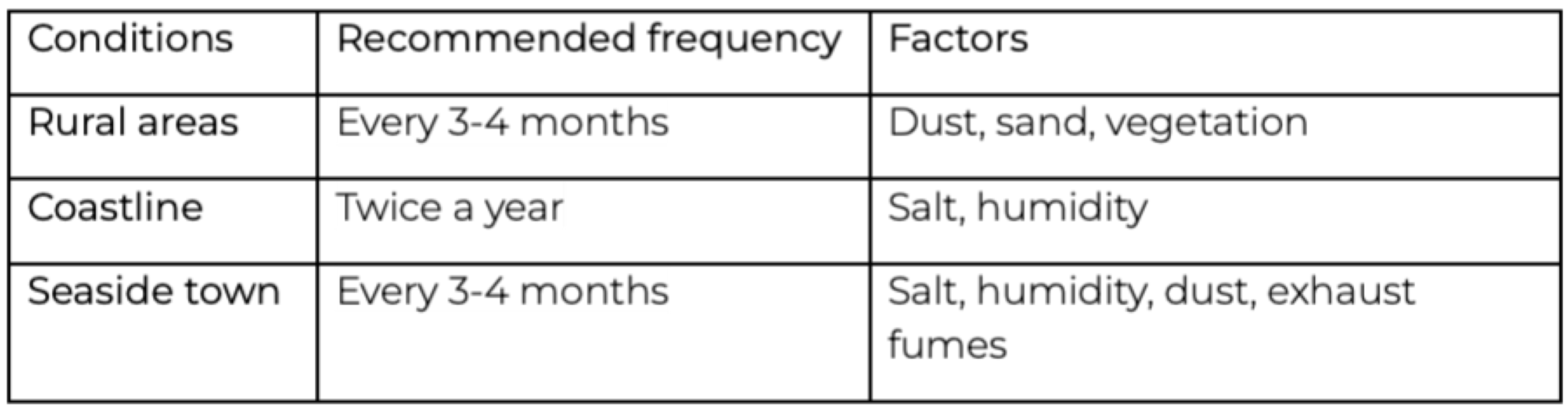
How do they clean them?
It is better not to do this yourself. A trained professional can do the job properly without putting themselves or the panels at risk.
Panels should be cleaned during the cooler part of the day, either early in the morning or in the evening, to avoid thermal shock. They should be washed with a soft sponge and without household detergents. High-pressure water jets and especially abrasive cleaners should be avoided, as they can cause microcracks and damage the protective coating. Tap water can leave mineral deposits, so the panels should be rinsed with demineralized water at the end. The technician must use proper fall protection.
Running the Inverter
An inverter is high-voltage equipment. Opening it is dangerous even with the system switched off, and any tampering voids the warranty. Only a professional engineer may service an inverter.
What can the owner do?
- Check that there is no water, condensation or rust on the surface.
- Watch for signs of overheating (discoloration and smell)
- Keep it clean and properly ventilated
- Monitor the equipment through the mobile app: there should be no overheating, no grid errors and nothing odd in the output figures
If anything does come up, record the error, screenshot the app and report it to the service team.
Things you must never do to the inverter on your own
· Don’t open the case
· Don’t tighten the terminals
· Don’t dry it with a hairdryer after a leak
· Don’t restart it blindly when errors appear
· Don’t change the settings
Checking Electrical Connections
Every three months, visually inspect the wiring and mounting hardware, but do not touch anything. Look for corrosion, loose bolts, rust and damaged insulation. Discoloured or melted connectors and a burnt smell point to a bad contact. Cracks, cuts and exposed conductors are dangerous.
If you find a problem, call an engineer in. Don't do electrical repairs yourself: tightening terminals and measuring resistance are best left to a licensed specialist.
Battery Maintenance
Batteries are next on the list. Keeping the temperature right and running the battery sensibly makes a lithium-ion unit both more efficient and longer-lived. A few practical tips:
Make sure the battery does not overheat. The optimal temperature range for lithium batteries is 15–25°C. Make sure the room where the battery is installed is air-conditioned or well ventilated. If the battery is installed outdoors, it should remain in the shade throughout the day.
Give it proper ventilation. Leave a gap between the battery and the walls so air can circulate, and keep the space around it clear. That layer of air is there to carry off the heat the unit generates as it works.
Keep the battery out of direct sun and damp. Even sealed units are vulnerable to UV and humidity.
Keep an eye on depth of discharge (DoD). The fewer full discharge cycles a battery goes through, the longer it lasts: at 100% DoD it is good for about 600 cycles, at 20% DoD for roughly 9,000 cycles. Therefore, check the EMS app to make sure the depth-of-discharge limit is properly configured.
Track the battery's temperature and condition in the app. Modern systems display the battery’s state of charge, voltage, and temperature. Excessively high or low temperatures can accelerate battery degradation.
Don't open the case. Any tampering with a battery risks a fire. Internal work – seal checks, cell balancing – is done by service engineers.
Storm Guard: Getting Ready for a Storm
Monsoon rains and tropical storms in Thailand often bring power cuts and damage to the grid. Storm Guard mode is built into every modern EMS, and sometimes into advanced inverters that work in tandem with a cloud platform. The system tracks bulletins from the national weather services, and once a storm warning comes in it gets the house ready: it sheds non-essential loads and pushes the battery to charge from the panels, or from the grid if it has to. When the alert is lifted, the EMS goes back to normal operation.
What can an owner do before a storm?
1. Check that the cables, the mountings and the seals on the equipment enclosures are all sound.
2. Confirm in the app that Storm Guard mode is active. It switches on by itself, but some EMS units need a one-off authorisation. Check that the battery is charging and that no other system errors are blocking the mode.
3. During the storm, keep the load on the grid to a minimum and avoid draining the battery completely.
4. Once it has passed, inspect the system and make sure it has returned to normal operation.
Where Does DIY End?
You can carefully remove dust and leaves from the panels yourself using a soft brush or water, making sure that water does not reach the cables. Visually inspect the mounting hardware and cables without touching them. Monitor the system through the app and respond to any warnings.
Where you need an engineer
· Any work inside inverters and batteries, tightening terminals, replacing cables
· Tracing the cause of overheating, corrosion or water leaks in the electrical cabinet
· Diagnosing a drop in output with professional instruments
· Reconfiguring the EMS, firmware updates, security checks
Don't try to take the equipment apart, open it up or change the system configuration yourself: you stand to lose the warranty and inadvertently start a fire.
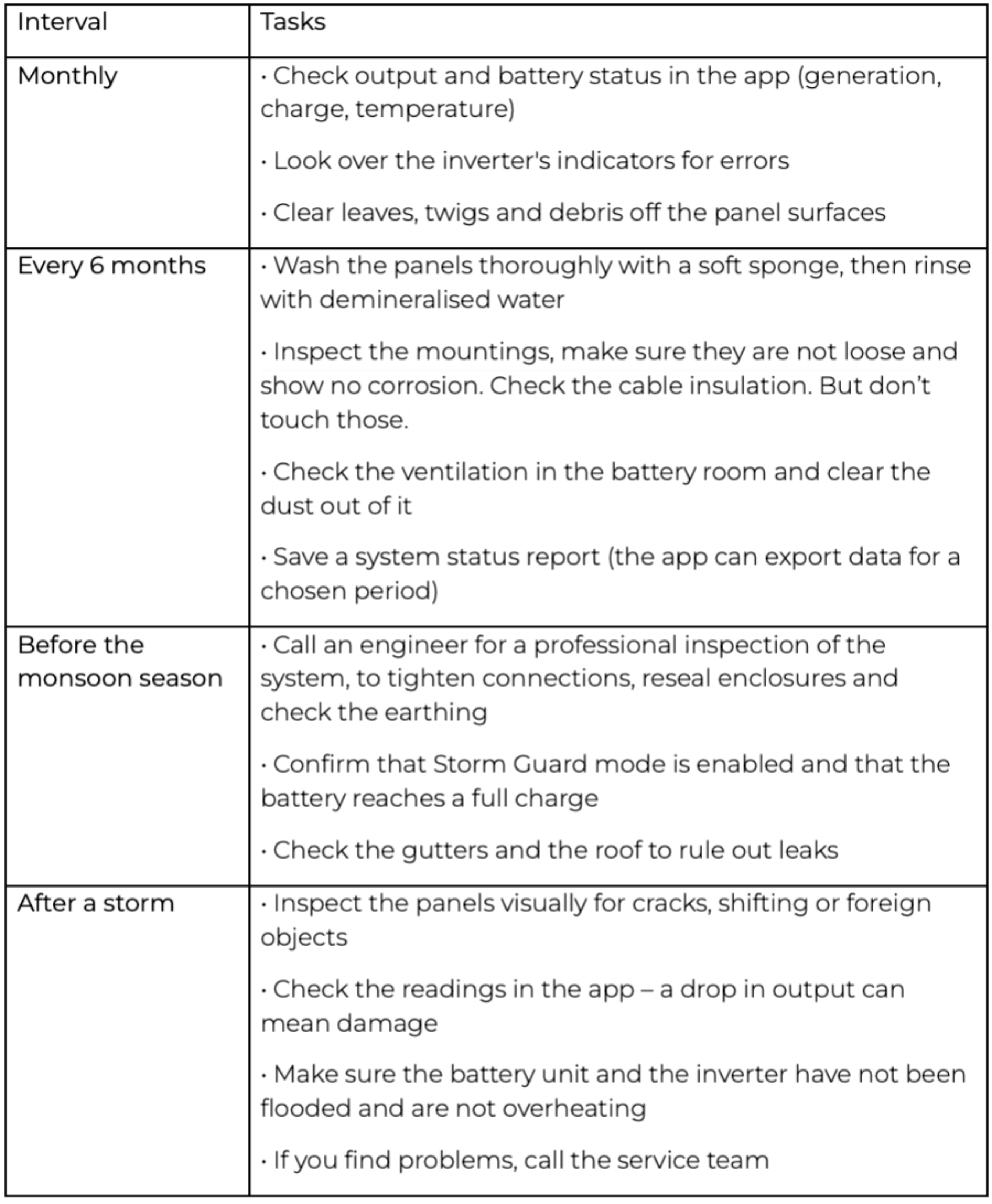
Checklist
Below is a handy checklist for owners. Print it out and pin it up next to the electrical panel.
Conclusion
A solar system needs regular maintenance if it is to work efficiently and last. Siriteja offers its customers free servicing under the Siriteja Care programme. It covers scheduled inspections and washing, remote EMS monitoring, battery charge management and storm preparation.[PL2] You follow a few simple guidelines; our specialists take on the hard parts.
Request a consultation
Tell us about your property: number of buildings, approximate size, and your goals for autonomy and comfort. We will propose a solution with clear KPIs and no unnecessary engineering complexity.